Tasks
Tasks are a way of automating repeated actions or generating charts through the InstaCharts API.
Tasks take up compute time and are therefore a finite resource. Each workspace has a pool of tasks based on its plan, and every seat adds the plan’s tasks to that pool. A Starter workspace with 3 seats has 3,000 tasks a month, shared by everyone working in it.
Task Types
Below are the tasks currently available in InstaCharts.
Data Syncs
Sheets can be synchronized back to their origin (for example Re-sync data with Google Sheets or sync a file from a link).
Each time a sheet is synced counts as one task, whether triggered manually or by an automatic schedule. Sheets on an auto updating schedule of once a day will use 30 tasks in a month.
Templates
Generating a chart or image through a template counts as one task.
Shared Chart Images
Each time a shared chart’s image regenerates to reflect updated data counts as one task.
API and Zapier Actions
Calls made through the API or Zapier integration also consume tasks:
- Add Data Row - adding a row to a sheet through Zapier or the API counts as one task.
- Generate Chart Image - generating a chart image through the API or Zapier counts as one task, tracked separately from template-based generation.
AI Apps
Changes made by AI apps connected through the MCP server (ex: Claude, ChatGPT) count as one task each. Creating a sheet, importing or uploading a file, adding, changing or deleting rows, creating or editing a chart, sharing a chart and rendering a chart image each use one task. These show up in Task History under API task types (ex: API Create Sheet, API Add Row, API Edit Chart, API Share Chart). Listing items, reading sheet data and creating an upload link are free.
Check Remaining Tasks
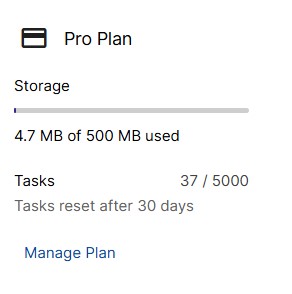
The current task count can be found on the left sidebar of your workspace.
The task count is a rolling sum over the past 30 days.
For a detailed log of every task run, including the item name, date, task type, and which app triggered it, open Task History in your workspace’s left sidebar.